How to Use LinkedIn Sales Navigator
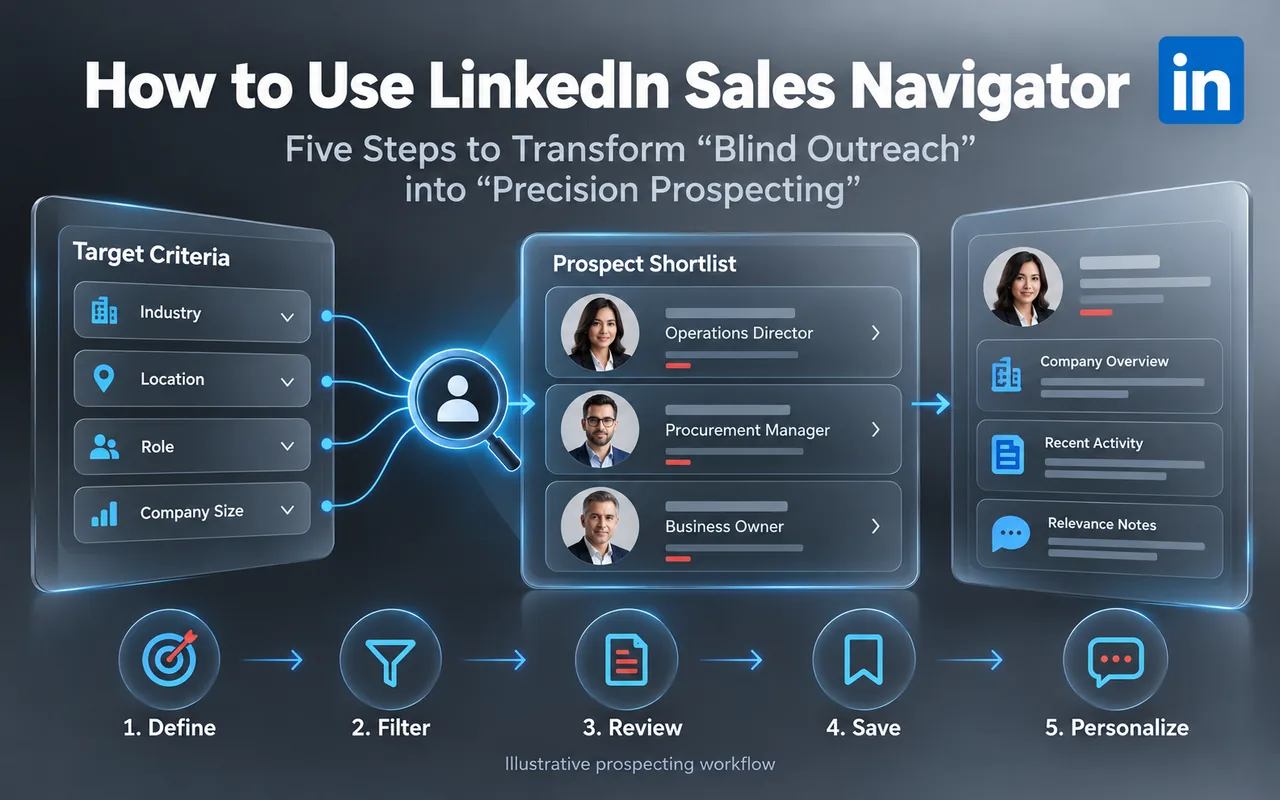
The free version of LinkedIn is just the tip of the iceberg. Sales Navigator is an AI-powered, in-depth sales tool built upon that foundation, designed to help sales teams minimize wasted effort.
In this article
01Know the Difference: LinkedIn vs. Sales Navigator
LinkedIn.com is a professional social network with limited visibility into connection tiers and search filters.
Sales Navigator is designed for sales scenarios: it centers on company data, facilitates multi-account management for enterprises, and operates beyond the limits of personal networks. It offers over 50 advanced filters and features such as Account IQ, TeamLink, lead recommendations, and CRM synchronization.
LinkedIn vs. Sales Navigator
- A professional social network
- Limited visibility into connection tiers and search filters
- Centers on company data
- Multi-account management for enterprises
- Works beyond the limits of personal networks
- 50+ advanced filters, Account IQ, TeamLink, lead recommendations and CRM sync
02A Five-Step Workflow
Five-step workflow
Step 1: Precision Prospecting
Filter target audiences based on company attributes (name, size, type, headquarters), roles and seniority (job title, level, tenure), and personal background (region, industry, language, education, groups).
You can also use "Buyer Intent" filters to identify prospects who have recently viewed your company page or personal profile.
Step 2: Map Relationships
Instantly access a list of all current employees at a target company, use AI to identify decision-makers, map out the purchasing decision chain, and find "referral allies" who can help facilitate introductions.
Step 3: Do Your Homework
Account IQ aggregates a company's strategic priorities, business challenges, and competitors, enabling you to address the most relevant points during your initial communication.
Step 4: High-Response Communication
Send up to 50 InMails per month that land directly in decision-makers' inboxes; the AI Icebreaker Assistant generates personalized opening messages based on the prospect's activity and background; Smart Links track when clients view your proposals or presentations, helping you gauge what truly interests them.
Step 5: Monitor Opportunity Signals
Upload existing client lists or trade show business cards via CSV; the system alerts you to key events, such as decision-makers changing jobs, new appointments, or company funding rounds and expansions, allowing you to seize the optimal window for outreach.
03Which Version Should You Choose?
- Advanced: Designed for growing sales teams; includes advanced search, relationship maps, TeamLink, Smart Links, buyer intent data, and CSV upload capabilities. Available for standalone accounts starting with a minimum of 5 users.
- Advanced Plus: Builds upon the Advanced tier by adding deep integration with CRMs (such as Salesforce) and lead creation capabilities. Available for standalone accounts starting with a minimum of 8 users.
Note: When using Sales Navigator in China, accounts should be set up through authorized resellers, and the latest official policies apply.
04Summary
Sales Navigator addresses not merely the question of "do you have a tool," but rather "can you spend your sales time on the right people?"
Want results like this for your brand?
Tell us your market, product and goals. We will reply with a clear plan.
TikTok for B2B: Where to Start

Why Should Factories Master Overseas Social Media?